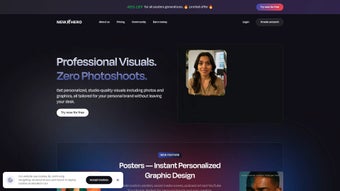

Download NewHero AI – AI Photography, Thumbnail Generator, Free Online Tool
Overview of NewHero AI
NewHero AI is a cutting‑edge, browser‑based graphics solution that targets personal brand builders, influencers, marketers, and anyone who needs eye‑catching visual assets without mastering complex design software. Powered by the latest generative‑AI models, the platform can create photorealistic portraits, product shots, and click‑driven thumbnails in seconds, simply from a text prompt. The service is completely free for core features, which makes it especially appealing for creators on a tight budget or small businesses that cannot afford pricey design subscriptions.
NewHero AI’s user interface is deliberately minimalistic: a clean canvas, intuitive sliders, and a handful of preset styles let users focus on creative direction rather than wrestling with toolbar overload. Whether you need a polished LinkedIn headshot, an Instagram carousel image, a YouTube thumbnail that boosts click‑through rates, or a quick mock‑up for a pitch deck, NewHero AI delivers results that look custom‑crafted while being produced at machine speed. The platform also supports deep customization – you can tweak color palettes, lighting, background scenes, and add text overlays that automatically adapt to the composition.
Because it runs entirely in the cloud, there is no need to install heavyweight software, and updates are rolled out automatically, guaranteeing you always have the newest AI models and design templates. In short, NewHero AI positions itself as the go‑to “design‑free” solution for anyone who wants professional‑grade photography and thumbnails without hiring a designer or learning Photoshop, while remaining secure, fast, and completely free for most everyday use cases.
Key Features and How to Use NewHero AI
NewHero AI packs a rich set of capabilities that make it a versatile tool for visual storytelling. Below is a detailed look at the most important features, followed by a step‑by‑step guide that shows exactly how you can turn a simple idea into a finished asset.
- AI‑Generated Photography: Produce realistic portrait or product photos by describing the scene, subject, mood, or lighting in plain language.
- Thumbnail Creator: Generate YouTube, Twitch, or blog thumbnails with AI‑suggested layouts, bold typography, and eye‑catching color schemes.
- Brand‑Consistent Color Palettes: Save custom palettes and apply them instantly across all assets, ensuring brand cohesion.
- Background Removal & Replacement: One‑click removal of existing backgrounds and insertion of AI‑generated environments or solid colors.
- Text Overlay Engine: Choose from a library of fonts, add dynamic text, and let the AI recommend optimal placement for readability.
- Style Presets: Access curated visual styles such as minimalist, vibrant, noir, pastel, and more to match different brand personalities.
- Batch Generation: Upload a CSV list of prompts to produce dozens of images or thumbnails in a single session, perfect for campaigns.
- Secure Cloud Storage: All generated files are saved in an encrypted cloud folder, with export options to PNG, JPEG, or SVG.
- Responsive Web Interface: Works flawlessly on desktop, tablet, and mobile browsers, letting you create wherever inspiration strikes.
- Automatic Updates: New AI models and design templates are added weekly without any manual download or installation.
Step‑by‑Step Usage Guide
- Open the Platform: Navigate to newhero.ai using any modern browser (Chrome, Edge, Firefox, Safari, or Opera). Click “Get Started” to launch the workspace.
- Create a Free Account: Register with an email address. The free tier unlocks cloud storage, batch generation (up to 20 items per session), and the ability to save custom presets. No credit card is required.
- Select Project Type: Choose “Photography” for portrait or product images, or “Thumbnail” for social‑media covers. Each mode loads a tailored set of AI prompts and layout suggestions.
- Enter Your Prompt: Type a concise description, e.g., “Young professional smiling in a bright office” or “Gaming thumbnail with neon text ‘Live Now!’”. The AI returns 3‑5 variations within seconds.
- Fine‑Tune the Result: Use the side panel sliders to adjust lighting, background, color palette, or add text overlays. Real‑time preview lets you see changes instantly.
- Save or Export: Click “Download” to store the file locally, or “Save to Cloud” for secure online access. Export formats include PNG, JPEG, and SVG, ensuring compatibility with most platforms.
- Batch Mode (Optional): For larger projects, upload a CSV containing multiple prompts, select a style, and let NewHero AI generate the full set automatically.
- Utilize Support Resources: Access short video tutorials in the Help Center or use the 24/7 live chat widget for quick troubleshooting.
By keeping the workflow simple and fully cloud‑based, NewHero AI eliminates the need for manual updates, driver installations, or local storage management. This streamlined approach makes it an ideal solution for busy creators who need high‑quality visuals on demand.
Compatibility, Pros, Cons, and Frequently Asked Questions
NewHero AI is built on responsive web technology, meaning it works on any operating system that can run a modern browser. This includes Windows 10/11, macOS Ventura and later, Linux distributions, as well as mobile platforms such as Android 9+ and iOS 13+. No additional plugins or extensions are required, and the service automatically adapts to different screen sizes for an optimal experience on desktops, tablets, and smartphones.
Pros
- Fully free core features – no hidden subscription fees.
- AI generates high‑quality images in seconds, saving countless hours of manual design work.
- Intuitive interface suitable for beginners and advanced users alike.
- Cross‑platform compatibility – works on desktops, tablets, and smartphones.
- Secure cloud storage ensures your assets are safe and accessible from any device.
- Regular automatic updates keep the AI models current with the latest design trends.
Cons
- Requires an internet connection; offline usage is not possible.
- Free tier imposes a limit on batch generation (up to 20 images per session).
- Advanced customization (e.g., precise pixel‑level editing) is limited compared to full‑featured software like Photoshop.
- Export resolution is capped at 4K for free users; higher resolutions require a paid upgrade.
Frequently Asked Questions
Is NewHero AI really free?
Yes, the core photography and thumbnail generators are completely free. Optional premium features, such as higher‑resolution exports and unlimited batch processing, are available through a paid plan.
Do I need any design experience to use NewHero AI?
No. The platform is built for users of all skill levels. The AI suggests layouts and color schemes, while the drag‑and‑drop interface lets anyone create professional‑looking visuals quickly.
Can I use the generated images for commercial purposes?
Absolutely. All images produced by NewHero AI are royalty‑free, and you own the rights to use them in marketing, advertising, or any commercial project.
What browsers are supported?
NewHero AI works on the latest versions of Chrome, Edge, Firefox, Safari, and Opera. For the best experience, keep your browser updated to the most recent release.
How secure is my data on NewHero AI?
All files are stored in encrypted cloud storage using industry‑standard TLS/SSL protocols. NewHero AI does not sell user data, and privacy policies comply with GDPR and CCPA regulations.
Conclusion & Call to Action
NewHero AI fills a noticeable gap in the market for fast, affordable, and high‑quality visual content creation. By leveraging AI, the platform removes the technical barriers that often prevent personal brand builders from producing professional photography and thumbnails. The free tier already offers enough power for most everyday creators, while optional premium upgrades ensure scalability for larger teams. If you’re looking to upgrade your online presence without hiring a designer or learning complex software, NewHero AI is a smart, secure, and instantly accessible solution. Start generating stunning images today—simply visit newhero.ai, sign up for free, and watch your brand visuals transform in seconds.
Pros: Free core features, lightning‑fast AI generation, cross‑platform, secure cloud storage.
Cons: Requires internet, limited batch size on free plan, no pixel‑perfect editing.



.png)



